Decide what happens next by dealing a hand of story cards.
A storylet is a small piece of story with a rule for when it fits. Your designers write them as cards in Storyletter, you drop one file into Unity, Unreal, Godot, or the web, and whenever your game needs to pick something, it asks the engine for a hand and gets the cards that fit the moment.
It's free and MIT-licensed, and there's no server to run.
Where you'd use it
Anywhere your game has to pick from a pool of possibilities, that's a box of cards. There's more on what it's for on the Why Storylet Studio page.
- Pick which scene of your story plays next.
- Choose the topics an NPC has to talk about.
- Spawn the encounter that fits this spot on the map.
- Decide which items turn up to be picked up.
- Offer the player a quest or a job.
- Work out who's in town today.
- Pick the bark line that fits right now (though Patter is the better tool for barks).
- Choose the lore that appears in the player's codex.
- Give an actor at an immersive event the topic to raise with a visitor.
- Send a visitor on to the next room of an interactive event.
Watch a hand get dealt
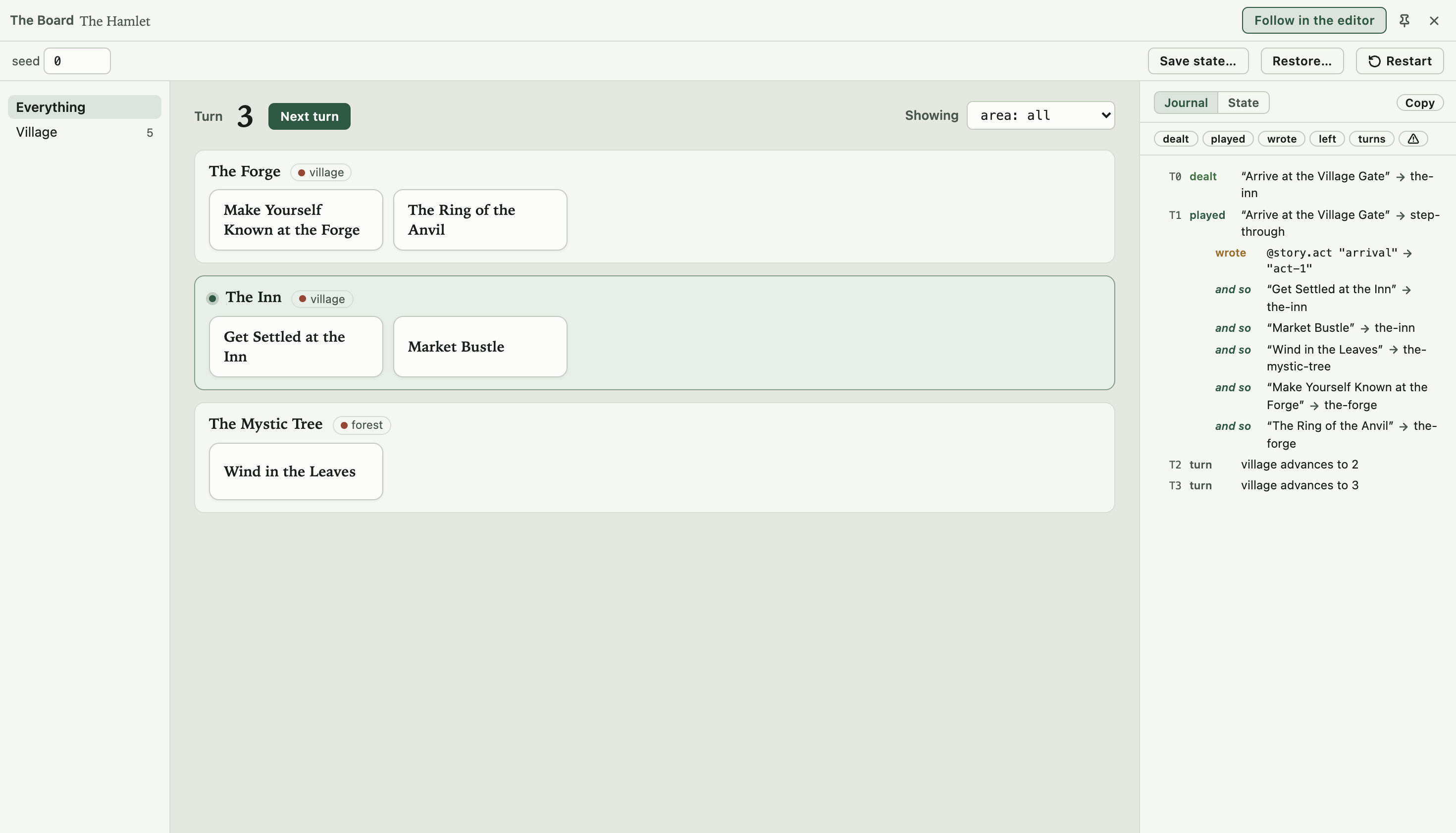
Press Play in Storyletter and the Board deals turn by turn, laying each place's hand out under its name so you can see what the engine picked and what it left in the box. The journal down the side records what it looked at and why it passed a card over, so "why didn't that happen?" has an answer you can read.
Storyletter
The editor, for the people designing the content. You design a card, give it a rule for when it comes up, and press Play to see what the real engine deals. The node view draws how your cards connect from the rules you wrote, and you never wire anything up. Read about Storyletter.
Storylet Engine
The runtime, for the people shipping the game. What Storyletter dealt at the desk is what your build deals, because the editor runs the same engine your game does. There’s one for your engine, and it loads the one bundle Storyletter publishes. Read about the runtimes.
 JavaScript
 Unity
Unity Unreal
 Godot
Godot
The CLI
The command line, for the project lead and CI. storyletengine creates, validates, compiles, merges, and measures coverage from a terminal. It runs the same code as the editor, so you can gate a build on it and fail the build on a card nothing can reach. Read about the CLI.
Download Storyletter
Storyletter is the authoring tool: the desktop editor your designers work in. The latest release is read live from GitHub; the runtime for your engine, the CLI, and two playable examples are on the download page.
Loading the latest release…